


How to Choose a Phone Stand for Video Calls
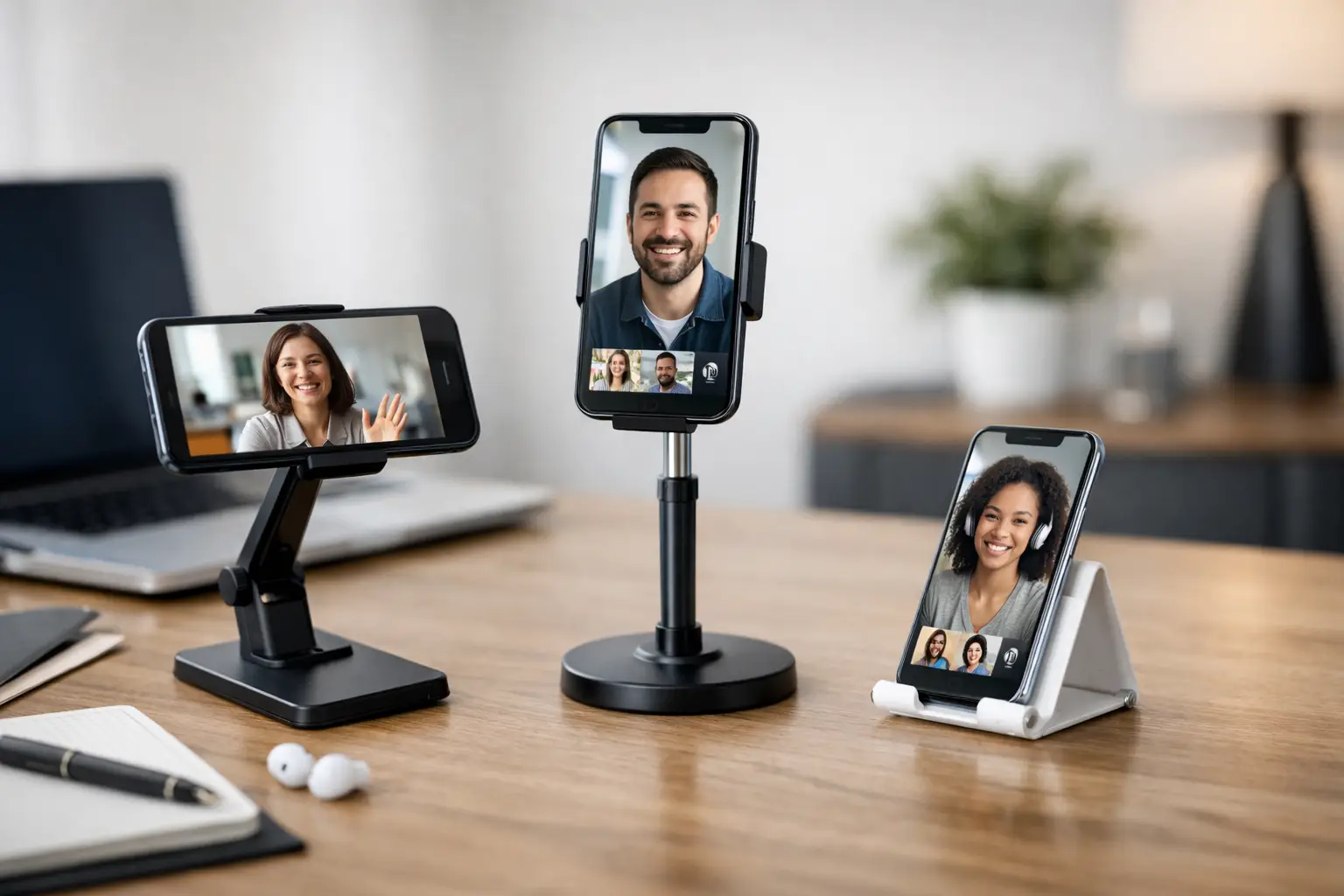
Your phone is balanced against a coffee mug five minutes before a meeting. The camera sits too low, the screen keeps sliding, and half your face disappears when you reach for a notebook. A dedicated phone stand for video calls is a small upgrade, but it can make remote work, family catch-ups, virtual appointments, and online classes feel far less improvised.
The best choice is not always the tallest stand or the one with the most adjustments. It is the one that holds your device securely, places the camera at a flattering and practical height, and fits the way you actually move through your day. Here is what to look for before you add one to your desk, kitchen counter, or travel bag.
Why a phone stand changes the call experience
Holding a phone during a 30-minute call gets tiring fast. Propping it against a book may work for a moment, but it often creates a low camera angle, a shaky image, and a screen that is difficult to see. A stand gives your phone a stable home so you can type, take notes, cook along with a friend, or simply relax without constantly repositioning the device.
Camera height matters more than most shoppers expect. When the lens sits closer to eye level, you look more engaged and the other person can see you clearly. It also reduces the unflattering chin-up angle that happens when a phone rests flat on a table. For work calls, that small shift can make your setup look more polished without buying a full desk studio.
A good stand also helps with everyday calls that have nothing to do with work. Parents can keep a phone upright while following a school event or talking with relatives. Home cooks can watch a recipe video without worrying about splashes. If you use your phone for workouts, telehealth visits, content creation, or online shopping, an adjustable stand earns its counter space quickly.
Choosing a phone stand for video calls
Start with where you plan to use it. A compact desk stand is ideal if most calls happen at a workstation. A taller floor stand can be more useful for fitness sessions, standing meetings, or filming in a larger room. A folding model is the easy pick for commuters, frequent travelers, and anyone who likes to move from the kitchen table to the couch.
The right design depends on your routine, so focus on these key details rather than shopping by appearance alone.
Check height and angle adjustment
Look for a stand that lets you tilt the phone toward your face and, ideally, raise it to a comfortable viewing level. Tilt is useful for reducing glare from windows or overhead lights. Height adjustment helps keep the camera closer to eye level, especially when you are seated at a desk.
A fixed stand can still be a smart, affordable choice if your setup rarely changes. Place it on a stack of books or a small desktop riser when you need more height. But if you share a workspace, switch between sitting and standing, or use your phone in several rooms, adjustable arms and telescoping designs offer more flexibility.
Be realistic about maximum height. A very tall stand is not automatically better. If the base is light or the arm is thin, raising a larger phone can make the whole setup wobble. For close-up desk calls, steady and moderately adjustable usually beats extra-tall and unstable.
Make sure it fits your phone and case
Most modern stands support a broad range of phone sizes, but the holder opening still matters. If you use a thick protective case, a wallet case, or a pop grip, check that the clamp or cradle has enough room. A stand that only fits a bare phone can become frustrating the first time you need to remove your case before every call.
Consider how the holder grips the device. A cradle-style stand supports the phone from below and is quick to use. A clamp-style holder gives a firmer grip, which is helpful when the arm is extended or when you want to position the phone vertically. Soft silicone padding is a welcome detail because it helps prevent scratches and keeps the phone from slipping.
Also check whether the stand blocks the charging port. For long meetings, being able to connect a cable while the phone is in place is a real convenience. An open bottom or a cable cutout lets you charge without twisting the cord around the stand.
Prioritize a stable base
Stability is the feature you notice only when it is missing. A stand should stay put when you tap the screen, plug in a charging cable, or adjust the angle. Weighted metal bases, wide footprints, non-slip pads, and sturdy hinges all help create a more dependable setup.
Lightweight plastic models are often easier to pack, and they can be perfectly fine for short calls on a steady table. The trade-off is that they may shift more easily with larger phones or heavier cases. If you regularly use a big phone, take calls around energetic kids or pets, or want to avoid mid-meeting adjustments, choose a design built with a wider, grippier base.
For bed, sofa, or countertop use, flexible gooseneck stands can be tempting. They are convenient, but very long flexible arms may bounce when you touch the screen. They work best when positioned once and left alone, not when you need to type or make frequent angle changes.
Match the stand to your call setup
Your surroundings affect which stand will feel useful every day. Think beyond the phone itself and picture a typical call from start to finish.
For a home office
Choose a stand that raises your phone beside or above your laptop screen. This helps you keep your eyes closer to the camera during video meetings rather than looking down at the desk. A metal desktop stand with adjustable height and angle is a practical choice for this setup.
If you use your phone as a second screen for chat messages, calendars, or meeting notes, landscape support is useful. Switching between portrait and landscape should feel simple, not like a balancing act.
For kitchen counters and multitasking
A compact stand with a broad, easy-to-clean base is a dependable option. You may use it for a quick video call, a recipe, a timer, or a how-to video while your hands are busy. Look for a tilt range that keeps the screen readable while you are standing.
Keep the stand away from direct heat, steam, and splash zones. A stand improves viewing, but it does not make your phone kitchen-proof.
For travel and small spaces
Foldable stands are made for grab-and-go convenience. They slide into a backpack, work bag, or drawer and give you a more reliable setup in a hotel room, shared office, or friend’s home. Choose one with a secure hinge rather than a loose kickstand-style flap, especially if you plan to use it often.
Portability comes with a trade-off: ultra-light stands may not have the same stability as a heavier desktop model. If you travel frequently, a foldable design with non-slip feet offers a useful middle ground.
Small features that add real value
Some extras are worth considering when they solve a problem you have often. A rotating holder makes it easier to shift from a vertical portrait call to a horizontal presentation or video. A built-in charging space helps during long sessions. A ring light attachment can help in dim rooms, though placing a lamp or window in front of you often creates more natural light.
Magnetic stands are convenient if your phone or case is compatible, but compatibility should be confirmed before buying. They make quick mounting easy, yet a clamp or cradle may feel more secure for frequent adjustments or heavier devices.
Color and finish are personal, but they can matter when the stand lives on your desk full-time. A simple neutral design tends to blend into workspaces and bedrooms, while a bright color can make it easier to spot in a busy household. Shop smart: function comes first, then choose a look you will be happy to see every day.
Set up your stand for a better-looking call
Even the right stand needs the right placement. Put it directly in front of you rather than off to one side, then raise or lower it until the camera is near eye level. Sit about an arm’s length away so your face and shoulders fit comfortably in the frame.
Face a window or soft lamp when possible. Avoid sitting with a bright window behind you, since it can turn your face into a silhouette. Before an important call, open the camera preview and check the frame, light, and background. Two minutes of setup can prevent a full hour of awkward angles.
A phone stand does not need to transform your home into an office or studio. It simply gives your calls a steadier place to start. Pick one that suits your space, your device, and your daily rhythm, then let the conversation take center stage.










Leave a comment